Product · Stop, retry, context
Actions and Context
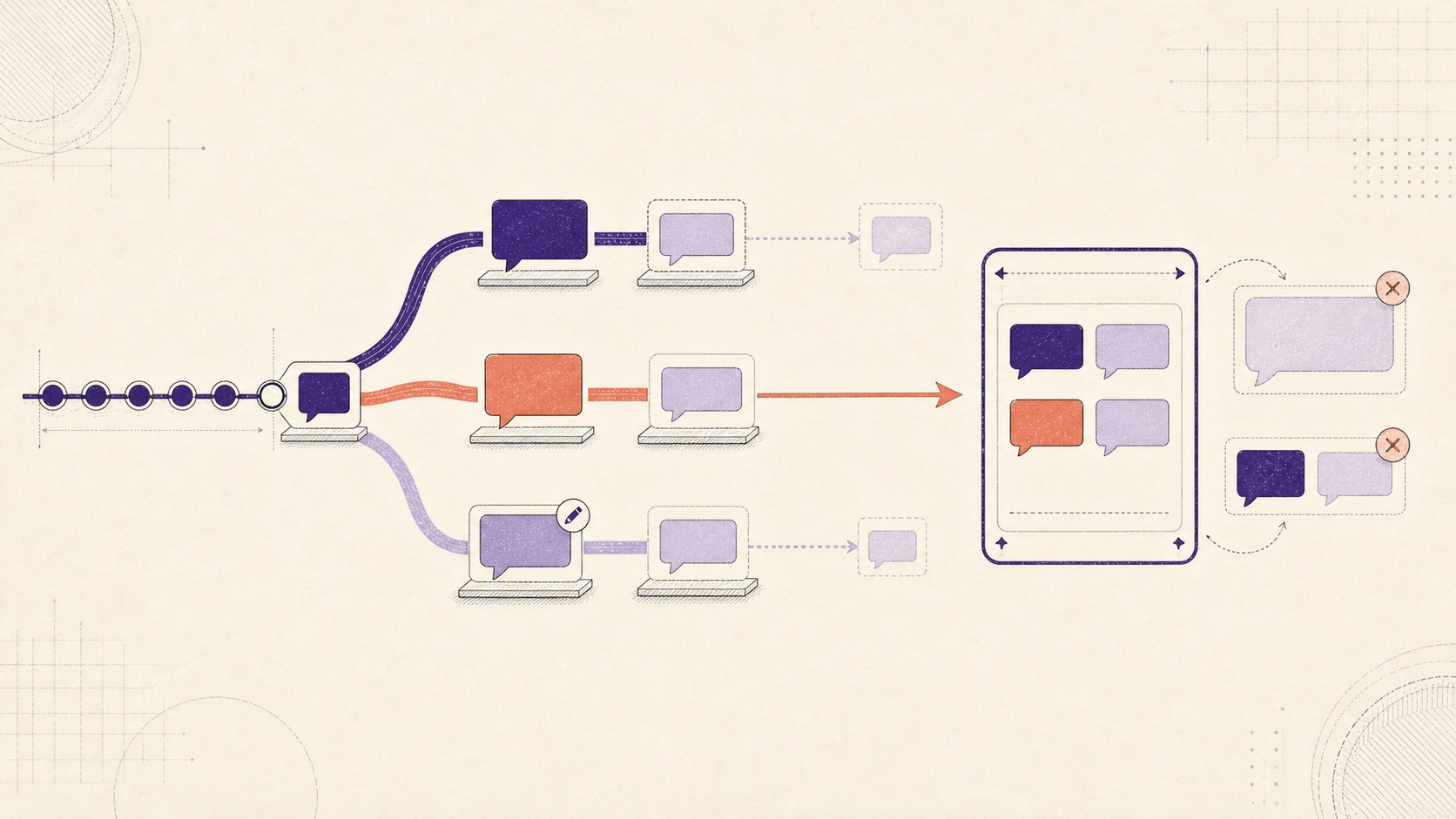
Editing, regenerating, stopping, and retrying all change the conversation graph. After any of them, you need to rebuild the model context within a fixed token budget.
Evidence & limits
- What the further reading establishes
- You can store conversation state directly and carry it from one model request to the next instead of trying to reconstruct it from the UI.
- What this lab runs
- The three action flows keep cancelled output, create new attempt and request ids, show what an edit invalidates, and rebuild the exact request as you change the token budget.
- What it does not prove
- The token counts are fixed estimates, not results from the selected model's production tokenizer.
Dataset
Branching Conversation
- Source
- Course-authored synthetic scenario
- License
- Not separately licensed
- Size
- 3 action flows · 29 budgets (14–42)
Further reading
- Conversation state
Primary · OpenAI API documentation · Current
Explains how to carry a conversation across separate model requests.
- AbortController
Guide · MDN Web Docs · Current
Covers the browser API used to stop fetches, streams, and generation work.
- Queueing a Series of State Updates
Guide · React · Current
Explains the queued state updates behind retry, edit, and streaming actions.
Lesson progressRestoring progress…
- CodeRestoring
- ExperimentRestoring
- CheckRestoring
Summary
How branches work. Stop keeps the partial assistant message and marks it cancelled. Retry or regenerate starts a new assistant attempt from the same user message. Editing a user message starts a new branch and marks everything that depended on the old version invalid without deleting it.
Building the request. The system instructions and current user prompt always go into the request. Completed history can only come along in full user-assistant pairs. Pick the newest pairs first, then send them in time order so truncation never leaves half a turn behind.
Staying in budget. If a newer completed pair is too big, keep looking for older pairs that fit. The token count is the exact total for the records you picked. If the required system instructions already exceed the budget, keep them selected; overflow is reported, and the caller shouldn't send that request as-is.
s1 · 6 tokens→Active userm-u3 · “Give one implementation detail.”m-a3 · a-31 · r-31cancelled · partial “Set future logits” retainedRetry / regeneratem-a4 · a-32 · r-32same parent m-u3 · new queued attemptEdit promptm-u3-e1 → m-a5 · a-33 · r-33m-a3 retained but invalid on edited branch21 / 26 used- Requireds1 + active m-u3
6 + 6 = 12 - Newest pairm-u2 + m-a2
20 tokens · skip - Older pairm-u1 + m-a1
9 tokens · include
Final request, in time orders1 → m-u1 → m-a1 → m-u321 / 26 tokens · no half-finished turn
overflow: true blocks the request instead of pretending it fits.Tracking each attempt. For every attempt, save stable message, parent-user, attempt, and request ids. Also save the model id, prompt version, sampling policy, included message ids, and final status. That gives you what you need to explain or replay two different outputs.
Knowledge check
Implementation
Build the exact request from the required system instructions, the current user prompt, and the newest complete history pairs that fit.
- Signature
def select_context(options):- Inputs
- options {system: messages, history: messages, activeUser: message, budget: int}
- Returns
- {selected: list[message], used: int, overflow: bool}
- Rule
always include system + active user; then add newest adjacent complete user/assistant pairs that fit- Example
budget 14 with turns u1/a1 and u2/a2 → select system, u2, a2, active user
Reference solution
Approach Build the exact request from the required system instructions, the current user prompt, and the newest complete history pairs that fit.
def select_context(options): system = options["system"] history = options["history"] active_user = options["activeUser"] budget = options["budget"] required_system = [ message for message in system if message.get("role") == "system" ] turns = [] index = 0 while index < len(history) - 1: user = history[index] assistant = history[index + 1] is_complete_turn = ( user.get("role") == "user" and user.get("status") == "complete" and assistant.get("role") == "assistant" and assistant.get("status") == "complete" ) if is_complete_turn: turns.append([user, assistant]) index += 2 else: index += 1 selected_turns = [] used = sum(message["tokens"] for message in required_system) + active_user["tokens"] overflow = used > budget if not overflow: for turn in reversed(turns): turn_tokens = sum(message["tokens"] for message in turn) if used + turn_tokens <= budget: selected_turns.insert(0, turn) used += turn_tokens selected_history = [ message for turn in selected_turns for message in turn ] return { "selected": required_system + selected_history + [active_user], "used": used, "overflow": overflow, }Build token-limited context selection and regeneration branches in Python before you work with a full conversation graph.
Saved results
Results created after your saved code passes its checks
Saved results
Results created after your saved code passes its checks
The replay is course data. The validation result is tied to the code you saved and checked.
Loading…